JUMiNGO - worldwide express shipping

Increase the efficiency and flexibility of your shipping processes with our free Shopware integration

OUR SHOPWARE INTEGRATION

EASY INTEGRATION
POWERFUL API
EFFICIENT SHIPPING

Shopware was founded in Germany in 2003. Since then, like Shopify or WooCommerce, it has established itself as a popular e-commerce shop system with over 100,000 customers.

The automated and powerful integration enables easy and rapid shipment import from Shopware online shops. This significantly reduces the time required for the shipping process.

Additionally, with JUMiNGO you ship your products worldwide always at the best price-performance ratio. Try it out directly and save up to 80% - starting from the very first shipment of your Shopware orders.
      HOW THE SHOPWARE INTEGRATION WORKS

      The Shopware integration into the JUMiNGO customer account requires no extensive technical understanding and is ready to use in just a few clicks. So that you can immediately benefit from the integration, we have created a quick guide for you:

      Step 1: Grant Admin permissions

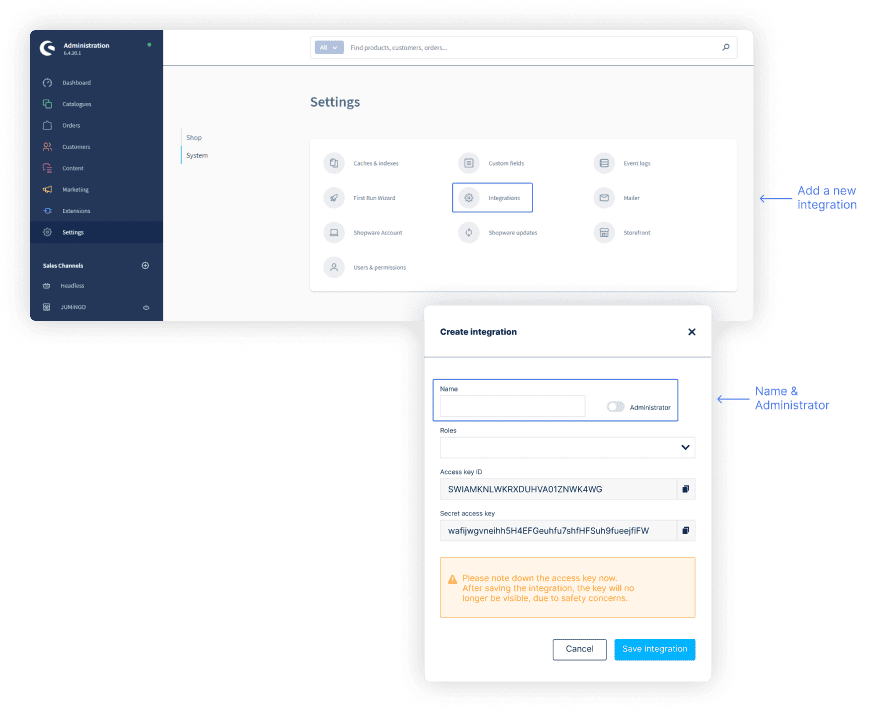
      First open the Admin area of your Shopware shop

      Now navigate to the Settings menu item. There you will find the "System" item next to the "Shop" item. Under "System" you will find "Integrations".

      Now click on "Add Integration".

      Enter "JUMiNGO" as the name of the integration and activate the "Administrator" option.

          Step 2: Set Up Connection

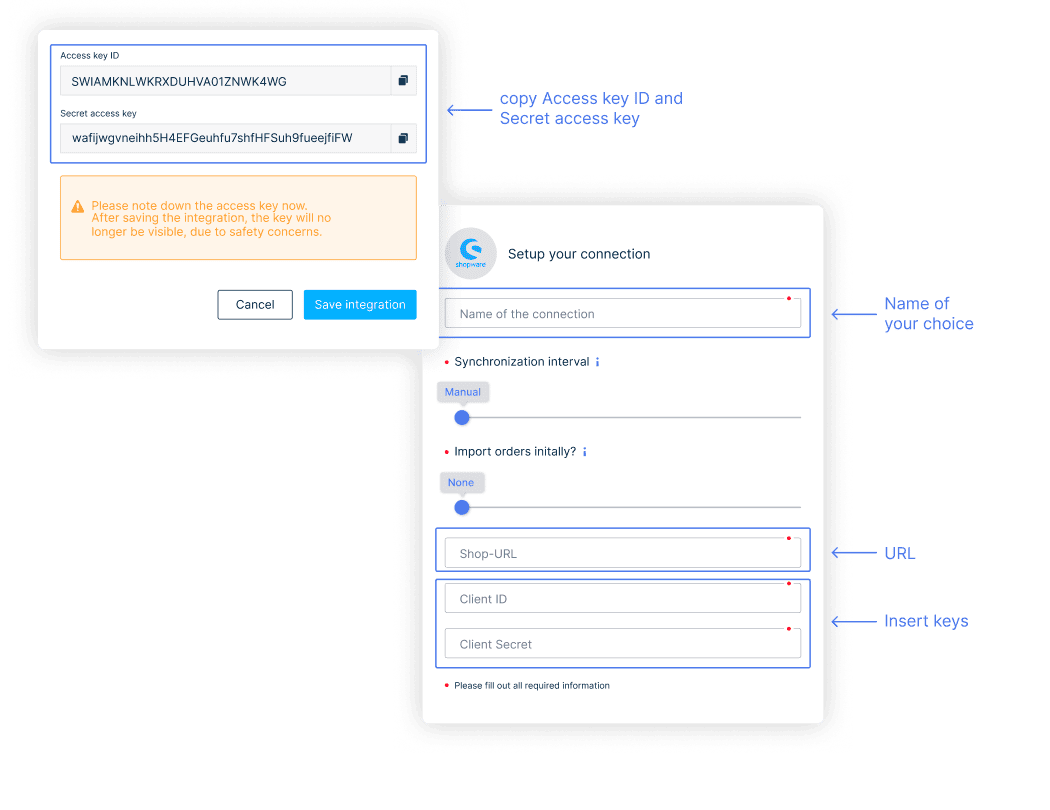
          Copy the Access key ID and the Secret access key. You will need this data when setting up the integration in the JUMiNGO customer account. Then click on "Save Integration".

          Enter a name for your connection on the left and the URL of your shop (e.g. https://my-shop.com)

          Enter the previously copied Access key ID in the Client ID field and the Secret Access Key in the Client Secret field and then click on "Connect an E-Commerce System".

              Step 3: Completion

              The Shopware integration is now successfully completed. Your Shopware shop will now be displayed in the JUMiNGO customer account in the list of connected e-commerce systems.

              Which orders are imported?

              During synchronization, all orders that have been newly added since the last synchronization are imported. Orders with the status "cancelled" are not imported. Shopware orders already existing in JUMiNGO are not imported again and are not updated in JUMiNGO when changed in Shopware.

                  What individual settings are possible?

                  When creating the connection, you can decide whether existing Shopware orders should be imported and if so, in which time period past orders should be considered. If you choose the maximum "All", orders up to 60 days old that are not cancelled will be imported. Alternatively, you can choose the intervals "last day", "two days" or "seven days".

                  You can also decide whether you want to synchronize your connection automatically or manually. For manual synchronization, do not set an interval. If you select a synchronization interval, new orders from Shopware will be automatically imported and created as JUMiNGO shipment drafts.

                  OTHER ECOM INTEGRATIONS

                  Discover our integrations for your online shop and save time and money by automating your shipping processes.

                  SHOPIFY INTEGRATION
                  Our Shopify integration enables you to handle shipping efficiently and automatically with JUMiNGO.
                  LEARN MORE
                  WOOCOMMERCE INTEGRATION
                  Benefit from a powerful and automated integration with the free WooCommerce integration.
                  CONNECT NOW
                  BILLBEE INTEGRATION
                  Save time and money by automatically importing all your shipments into your JUMiNGO customer account with our Billbee integration.
                  DISCOVER NOW

                  NO SUITABLE INTEGRATION FOR YOUR SYSTEM?


                  Do you have your own (inventory management) system? With the JUMiNGO Customer API you have the possibility to connect your in-house system with your JUMiNGO customer account. This way you can also benefit from the advantages of our online shop integrations. Our interface is free, maximally flexible and easy to integrate by your developers.

                  For example, you can easily automate processes such as adding and editing new shipments and accessing shipping labels and shipment data.

                  Here you can find the Integration Guide for our Customer API as well as the technical documentation.

                  Homepage
                  chevron_right
                  Tipps & Tricks
                  chevron_right
                  Shopware
                  Products & Services
                  arrow_drop_up
                  Get a QuoteTrackingHelp Centre
                  Company
                  arrow_drop_down
                  Jobs & CareerTerms & ConditionsLegal noticePrivacy policy
                  Cookie-settings
                  Shipping within Europe
                  arrow_drop_down
                  Shipping to AustriaShipping to SwedenShipping to United KingdomShipping to FranceShipping to SwitzerlandShipping to SpainShipping to ItalyShipping to Poland
                  Worldwide Shipping
                  arrow_drop_down
                  Shipping to the USAShipping to ChinaShipping to AustraliaShipping to the UAEShipping to HongkongShipping to CanadaShipping to TurkeyShipping to India
                  Payment methods
                  Partners Network
                  4.6 out of 5 | 9872 Reviews
                  Copyright © 2025 JUMiNGO | All rights reserved.
                  linkedin_footer